Digital note-taking has evolved significantly over the last decade, but many professionals and students still prefer the natural experience of writing on paper. This is exactly where devices like the reMarkable tablet stand out. Designed to replicate the feel of writing on real paper while offering the advantages of digital technology, this tablet has become one of the most talked-about tools for focused productivity, reading, and note-taking.At Heaven Star Electronics, we constantly explore innovative productivity devices that simplify work and learning. The reMarkable tablet is a unique digital writing device created for distraction-free thinking and organization. In this guide, we highlight the most important reMarkable tablet features and explain how they benefit everyday users. Whether you are considering the reMarkable 2 features for professional note-taking or digital reading, understanding these capabilities will help you decide if this tablet is the right tool for your workflow.
Paper-Like Writing Experience
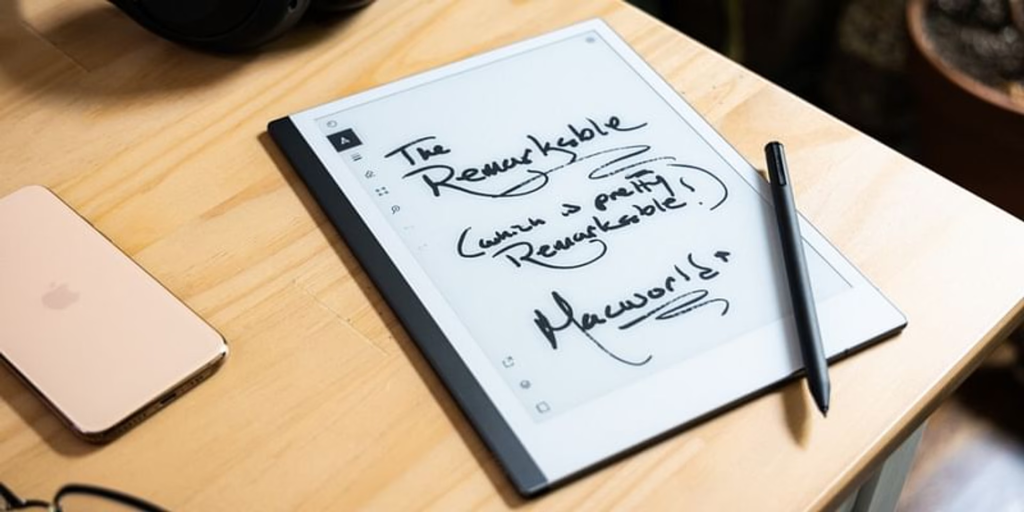
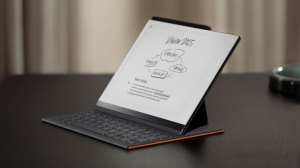
One of the most distinctive aspects highlighted in many reMarkable tablet reviews is the incredibly natural writing experience. Unlike traditional tablets that use glossy screens, the reMarkable tablet uses a specially designed textured display that closely mimics the feel of writing on paper. When using the stylus, users experience realistic friction that makes handwriting feel comfortable and precise.This feature is particularly valuable for professionals, designers, and students who prefer handwriting over typing. The reMarkable 2 features include an ultra-low latency writing system that captures every pen movement instantly. This allows users to sketch diagrams, annotate documents, or write notes smoothly without delays, creating a natural writing environment that feels very close to pen and paper.
Ultra-Thin and Minimalist Design
Another impressive aspect of the reMarkable tablet features is its sleek and minimalist design. The reMarkable 2 is known for being one of the thinnest tablets available, making it highly portable and comfortable to carry in a backpack, notebook sleeve, or work bag.This elegant design also supports the brand’s philosophy of distraction-free productivity. The
reMarkable tablet avoids unnecessary applications, notifications, or entertainment features. Instead, it focuses entirely on writing, reading, and thinking. This minimal approach makes it ideal for professionals who want a dedicated device for capturing ideas without digital distractions.
Powerful Note-Taking Tools
- Advanced Handwriting Support
The reMarkable tablet allows users to write naturally while offering multiple pen styles, thickness options, and writing tools. This flexibility makes it ideal for note-taking, brainstorming, and sketching.
- Easy Organization of Notes
One of the most practical reMarkable tablet features is the ability to organize notebooks into folders and categories. This helps users manage large volumes of notes efficiently.
- Handwriting to Text Conversion
Among the useful reMarkable 2 features is handwriting recognition that converts written notes into digital text, making it easier to share or edit information.
- Document Annotation Tools
The reMarkable tablet allows users to annotate PDFs and documents directly on the screen. Professionals can highlight, underline, and comment on files with ease.
- Multiple Writing Templates
The device offers built-in templates such as lined pages, grids, checklists, and planners. These reMarkable tablet features help users structure their notes more effectively.
- Instant Page Navigation
Users can quickly move between pages, notebooks, and documents without delays. This smooth navigation enhances the overall writing and reading experience.
Exceptional E-Ink Display for Reading
Another standout feature mentioned in many reMarkable tablet reviews is its advanced E-Ink display technology. Unlike conventional tablet screens, the reMarkable tablet uses a monochrome digital paper display that reduces glare and mimics the appearance of printed text on paper.This display makes the device extremely comfortable for extended reading sessions. Professionals and students can read PDFs, eBooks, and documents without experiencing eye strain commonly associated with bright LCD screens. The reMarkable 2 features also ensure that the screen remains highly visible even in bright environments, making it suitable for office use, classrooms, or travel.
Cloud Sync and File Management
The reMarkable tablet is designed to work seamlessly with cloud synchronization systems, allowing users to access their notes across multiple devices. Once documents are saved on the tablet, they can be synced with companion applications on smartphones, tablets, and computers.This integration ensures that users always have access to their notes wherever they are. One of the practical
reMarkable tablet features is the ability to upload PDFs, presentations, and documents directly to the tablet. Users can then review, annotate, and organize these files without needing a laptop or traditional paper documents.

Long Battery Life for Continuous Use
Battery performance is another important advantage among the reMarkable 2 features. Unlike conventional tablets that require daily charging, the reMarkable tablet can last for several days or even weeks, depending on usage. This extended battery life makes it ideal for professionals who travel frequently or attend long meetings and conferences.The efficient E-Ink display consumes significantly less power compared to traditional screens. This allows the reMarkable tablet to deliver long-lasting performance without frequent charging interruptions. Users can confidently rely on the device for note-taking, document review, and brainstorming sessions throughout their workday.
Who Should Use the reMarkable Tablet?
- Professionals and Executives
The reMarkable tablet is ideal for capturing meeting notes, brainstorming ideas, and reviewing documents without distractions.
- Students and Researchers
Learners can use the device to organize study notes, annotate academic papers, and read digital textbooks.
- Writers and Creatives
Writers often appreciate the paper-like writing experience of the reMarkable tablet’s features for drafting ideas and outlines.
- Designers and Visual Thinkers
The stylus support and sketching tools allow designers to visualize concepts and diagrams quickly.
- Business Consultants
Consultants can annotate reports, create notes during meetings, and store important documents in one digital workspace.
- Minimalist Productivity Enthusiasts
Anyone seeking a distraction-free environment for thinking and writing can benefit from the reMarkable 2 features.
Why Choose Heaven Star Electronics
- Access to Innovative Productivity Devices
At Heaven Star Electronics, we offer advanced tools like the reMarkable tablet designed for professionals and students.
- Authentic Technology Products
Every reMarkable tablet we provide is genuine and sourced from trusted technology manufacturers.
- Expert Product Knowledge
Our team helps customers understand the reMarkable tablet features and how the device can enhance productivity.
- Reliable Customer Assistance
We support customers in choosing the right productivity tools and understanding their capabilities.
- Trusted Electronics Supplier
Many customers rely on us for premium devices, including tablets, digital notebooks, and smart productivity gadgets.
- Competitive Pricing and Availability
We aim to make devices like the reMarkable 2 accessible with reliable service and support.
Conclusion
The reMarkable tablet is a powerful digital writing device designed for individuals who value focus, simplicity, and efficiency. With its paper-like writing experience, advanced note-taking tools, and distraction-free design, it offers a unique alternative to traditional tablets and notebooks. These carefully designed reMarkable tablet features make it an excellent choice for professionals, students, and creatives who prefer a natural writing environment combined with digital convenience.At
Heaven Star, we believe tools like the reMarkable 2 are redefining how people capture ideas and organize information. By combining the simplicity of paper with modern digital technology, the reMarkable tablet provides a productive workspace that supports creativity, learning, and professional efficiency.
FAQ’s
- What is the reMarkable tablet used for?
The reMarkable tablet is designed for digital writing, note-taking, document annotation, and reading in a distraction-free environment.
- What are the main reMarkable tablet features?
Key reMarkable tablet features include a paper-like writing screen, E-Ink display, stylus support, document annotation, and cloud synchronization.
- What makes reMarkable 2 different from regular tablets?
The reMarkable 2 features focus on writing and reading rather than entertainment apps, creating a distraction-free workspace.
- Can the reMarkable tablet convert handwriting into text?
Yes, one of the useful reMarkable tablet features is handwriting recognition that converts written notes into digital text.
- Is the reMarkable tablet good for students?
Yes, students can use the reMarkable tablet to take lecture notes, annotate PDFs, and organize study materials.
- Does the reMarkable tablet support PDFs?
Yes, users can upload and annotate PDF documents directly on the reMarkable tablet.
- How long does the reMarkable battery last?
Thanks to its E-Ink display, the reMarkable 2 offers extended battery life that can last several days or weeks, depending on usage.
- Where can I buy the reMarkable tablet?
You can purchase the reMarkable tablet from trusted electronics suppliers like Heaven Star Electronics.


 Login/RegisterAccounts
 0
0

 SEO Team


