Effective note-taking plays a major role in how well we remember information, organize ideas, and stay productive in work or academic environments. Traditional notebooks are useful, but they often become cluttered, difficult to search, and hard to organize over time. Digital tools are now transforming the way people capture and manage information, and devices like the reMarkable tablet are designed specifically to create a distraction-free digital writing experience that feels like real paper.At Heaven Star, we have seen a growing interest in digital note taking reMarkable solutions among professionals, students, and creatives. The reMarkable tablet note taking system allows users to write naturally with a stylus while storing notes digitally in an organized format. By learning how to use reMarkable for notes, users can improve their workflow, structure ideas more clearly, and access their notes anytime across devices.
Understanding the reMarkable Tablet for Digital Note-Taking
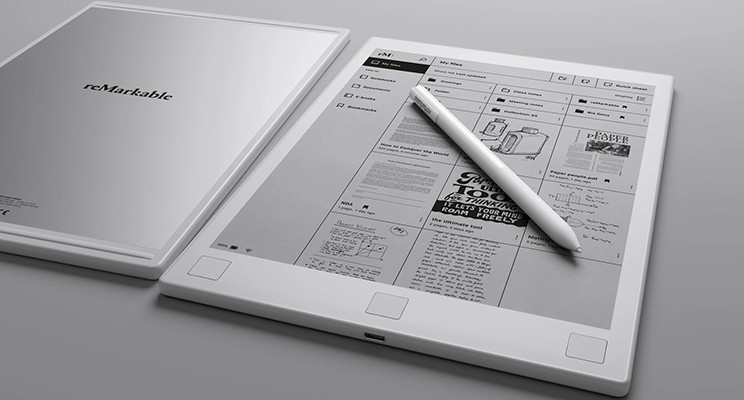
The reMarkable tablet is designed to replicate the feeling of writing on paper while providing the benefits of digital organization. Unlike conventional tablets filled with distracting apps and notifications, the reMarkable focuses on reading, writing, and thinking. This minimalistic approach allows users to concentrate fully on note-taking without interruptions.One of the key advantages of the reMarkable tablet note taking is the ability to combine handwritten notes with digital features. Notes can be organized into folders, edited easily, and synchronized with other devices. When learning how to use reMarkable for notes, users discover that the tablet helps create a structured and searchable system that is far more efficient than traditional notebooks.
Why the reMarkable Tablet Is Ideal for Digital Notes
- Paper-Like Writing Experience
The reMarkable tablet is designed with an E-Ink display that closely mimics real paper. This allows users to write comfortably for long periods without eye strain.
- Distraction-Free Workspace
Unlike smartphones or regular tablets, the device focuses entirely on reading and writing. This helps users concentrate fully during reMarkable tablet note taking sessions.
- Organized Digital Notebooks
With digital note taking reMarkable, notes can be grouped into folders, notebooks, and categories, making information easier to locate later.
- Cloud Synchronization Across Devices
Notes created on the reMarkable tablet can be synced with laptops and smartphones, ensuring access to ideas and documents from anywhere.
- Easy Editing and Rearranging
Users can move pages, highlight text, or reorganize notes without rewriting entire sections, which improves productivity.
- Ideal for Long Writing Sessions
The device’s E-Ink display reduces screen glare, making it comfortable for extended writing and reading sessions.
How to Use reMarkable for Notes Effectively
Learning how to use the reMarkable for notes efficiently can significantly improve productivity and information management. Instead of writing notes randomly, users can structure their notebooks according to subjects, projects, or tasks. This organized approach helps create a clear system for retrieving information later.Another important step is developing consistent note-taking habits. When practicing
digital note taking reMarkable, users can combine headings, bullet points, and diagrams to capture ideas clearly. The tablet also allows users to annotate PDFs and documents directly, making it useful for reviewing reports, reading research papers, or preparing presentations.

ReMarkable Note-Taking Tips for Better Productivity
- Create Separate Notebooks for Different Topics
One of the best reMarkable note taking tips is to organize notebooks by subject, project, or task category to keep information structured.
- Use Templates for Structured Notes
The reMarkable tablet includes templates such as lined pages, grids, planners, and checklists to help structure notes effectively.
- Highlight Important Ideas
During reMarkable tablet note taking, users can highlight key concepts or decisions to make reviewing notes easier later.
- Combine Handwriting with Diagrams
Visual thinking can improve understanding. The reMarkable tablet allows users to sketch diagrams, flowcharts, and mind maps easily.
- Annotate PDFs and Documents
One valuable reMarkable note taking tip is to write directly on PDFs while reading reports, research papers, or study material.
- Regularly Review and Organize Notes
With digital note taking reMarkable, users can quickly move pages between folders to maintain a clean and organized note system.
How reMarkable Improves Digital Note-Taking Workflows
Digital tools often promise convenience but introduce distractions due to notifications and apps. The
reMarkable tablet takes a different approach by creating a focused environment dedicated to writing and reading. This design helps users stay engaged with their notes and ideas.For professionals and students practicing reMarkable tablet note taking, this focused experience allows deeper thinking and better idea organization. By following effective reMarkable note taking tips, users can transform scattered notes into structured knowledge that supports productivity, learning, and creative work.
Why Choose Heaven Star
- Access to Premium Digital Writing Devices
At Heaven Star, we provide advanced tools like the reMarkable tablet, designed for focused digital writing.
- Authentic Technology Products
We ensure that every reMarkable tablet we offer is genuine and sourced from trusted manufacturers.
- Expert Guidance on Digital Note-Taking Tools
Our team helps customers understand how to use reMarkable for notes effectively for work, study, or creative projects.
- Latest Productivity Technology
We regularly bring innovative devices supporting digital note taking, reMarkable, and modern productivity workflows.
- Trusted Electronics Supplier
Many professionals and students rely on us for sourcing reliable digital writing devices like the reMarkable tablet.
- Reliable Customer Support
We assist customers with setup guidance and best practices for reMarkable tablet note taking.
Conclusion
Digital note-taking tools are changing how professionals and students capture information, organize ideas, and manage knowledge. The reMarkable tablet offers a unique solution by combining the simplicity of writing on paper with the efficiency of digital organization. By learning how to use reMarkable for notes, users can create a structured note system that improves productivity and clarity.At
Heaven Star, we believe the reMarkable tablet note taking experience represents a modern approach to writing and thinking. With helpful reMarkable note taking tips and a distraction-free design, the device helps users turn everyday notes into organized insights that support learning, creativity, and professional work.
FAQs
- What is the reMarkable tablet used for?
The reMarkable tablet is designed for writing, reading, and digital note taking reMarkable in a distraction-free environment.
- How does the reMarkable tablet note taking work?
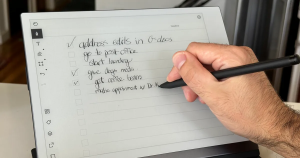
Users write naturally with a stylus on the reMarkable tablet, and the notes are saved digitally for organization and syncing.
- Can reMarkable replace traditional notebooks?
Yes, the reMarkable tablet can replace paper notebooks by storing multiple digital notebooks in one device.
- Are there templates for taking notes on reMarkable?
Yes, the tablet includes templates such as lined pages, grids, and planners that support reMarkable tablet note taking.
- Can you annotate documents on reMarkable?
Yes, users can write directly on PDFs and documents using the reMarkable tablet.
- Is reMarkable good for students?
Yes, students can use the reMarkable tablet to record lecture notes, review PDFs, and organize study materials.
- What are the best reMarkable note taking tips?
Some useful tips include organizing notebooks, using templates, highlighting important points, and reviewing notes regularly.
- Where can I buy a reMarkable tablet?
You can purchase the reMarkable tablet from trusted electronics suppliers like Heaven Star.


 Login/RegisterAccounts
 0
0


 SEO Team


