Modern professionals handle a constant stream of information, meeting notes, project ideas, planning documents, research material, and daily task lists. While laptops and tablets offer powerful digital tools, many users still struggle with distractions, eye strain, and the complexity of managing files across multiple apps. This has created a demand for focused digital tools that combine the simplicity of writing on paper with the efficiency of modern technology. The reMarkable tablet for productivity has emerged as one of the most effective solutions designed specifically for distraction-free work.At Heaven Star, we regularly observe professionals looking for devices that improve concentration and streamline note organization. The reMarkable tablet stands out because it offers a digital paper experience that feels natural while still providing powerful document management features. Many business leaders, designers, consultants, and students choose this device because the reMarkable productivity benefits help them capture ideas quickly, organize notes efficiently, and maintain a more focused workflow.
What Makes the reMarkable Tablet Unique for Productivity
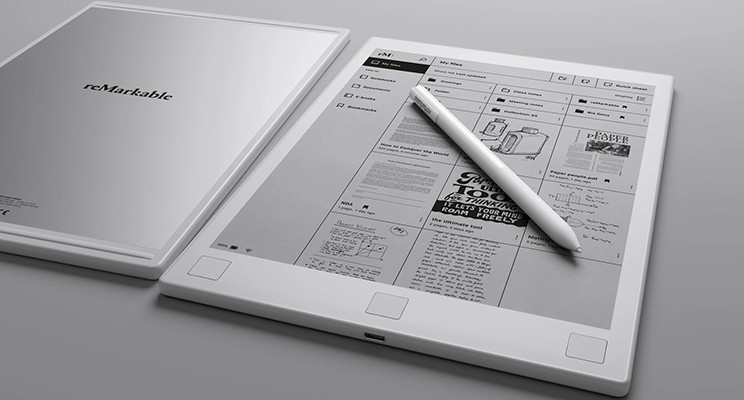
The reMarkable tablet is designed around the concept of digital paper, allowing users to write, sketch, and annotate documents just like they would on a physical notebook. Unlike traditional tablets that include numerous apps, notifications, and entertainment features, this device focuses entirely on writing, reading, and thinking. This minimal design helps users stay focused on their tasks without the constant interruptions often associated with smartphones and standard tablets.Another reason why professionals use reMarkable is the natural writing experience provided by its advanced e-ink display. The screen mimics the texture and resistance of real paper, creating a comfortable environment for long writing sessions. Professionals who prefer handwritten notes often find that this device bridges the gap between analog notebooks and digital organization, making it an ideal
reMarkable tablet for productivity.
Key reMarkable Tablet Features That Support Productivity
- Paper-Like Writing Experience
One of the most appreciated reMarkable tablet features is its e-ink display that feels like writing on paper. The screen reduces glare and eye strain, making it comfortable for long periods of note-taking.
- Distraction-Free Work Environment
The reMarkable tablet removes unnecessary apps, social media notifications, and distractions. This allows professionals to focus entirely on writing, planning, and reading documents.
- Efficient Document Organization
Users can organize notes, PDFs, and notebooks into folders, making it easier to manage projects and meeting notes. This structured approach enhances reMarkable productivity benefits for busy professionals.
- PDF Annotation and Document Editing
The tablet allows users to highlight, write comments, and mark important sections directly on documents. This makes reviewing reports and contracts much more efficient.
- Cloud Synchronization
Notes and files created on the reMarkable tablet can be synced with connected devices, allowing professionals to access their work from smartphones or computers.
- Lightweight and Portable Design
The tablet is thin and lightweight, making it easy to carry to meetings, offices, or business trips while maintaining productivity on the go.
Why Professionals Use reMarkable Tablets in Daily Work
Professionals across industries often deal with brainstorming sessions, strategic planning, and complex projects that require quick idea capture. Traditional laptops sometimes interrupt creative thinking because users must navigate multiple applications or type instead of writing freely. The reMarkable tablet for productivity allows professionals to write naturally while keeping their ideas digitally organized.Another reason why professionals use reMarkable is the ability to maintain a focused workspace. The tablet’s simple interface encourages deep thinking and reduces digital distractions. Many users report that writing tasks, project outlines, and meeting notes feel more natural on the
reMarkable tablet, allowing them to work more efficiently while maintaining clarity in their workflow.

ReMarkable Productivity Benefits for Modern Workflows
- Improves Focus During Work Sessions
The minimal interface of the reMarkable tablet helps professionals concentrate on important tasks without notifications or unnecessary apps interrupting their workflow.
- Encourages Natural Idea Development
Writing by hand on a digital surface helps professionals capture ideas more quickly, supporting creativity and brainstorming during planning sessions.
- Simplifies Meeting Note Organization
The tablet allows users to create separate notebooks for meetings, projects, and research topics, helping professionals keep information well organized.
- Reduces Paper Usage in Offices
By replacing physical notebooks, the reMarkable tablet for productivity helps professionals maintain digital records while minimizing paper clutter.
- Enhances Document Review Processes
Professionals can annotate contracts, reports, and research documents directly on the screen, making review tasks faster and more efficient.
- Supports Mobile Productivity
The lightweight design allows professionals to carry the device easily between meetings, offices, or travel locations.
How Different Professionals Use reMarkable Tablets
- Business Executives and Managers
Many leaders use the reMarkable tablet to outline strategies, record meeting discussions, and track project goals in an organized digital notebook.
- Consultants and Analysts
Professionals who review reports frequently benefit from the ability to annotate PDFs and highlight important information during client work.
- Designers and Creative Professionals
The tablet allows quick sketching and concept development, making it useful for creative brainstorming sessions.
- Students and Researchers
Academic professionals use the tablet to read research papers, annotate documents, and organize study notes efficiently.
- Entrepreneurs and Start-Up Founders
Business owners often rely on the device for capturing ideas, planning strategies, and organizing important notes across multiple projects.
- Remote and Hybrid Workers
Professionals working from multiple locations benefit from the portability and cloud syncing capabilities of the tablet.
Why Choose Heaven Star
- Access to Innovative Productivity Devices
At Heaven Star, we supply advanced tools such as the reMarkable tablet for productivity to support modern professional workflows.
- Authentic Technology Products
We ensure every reMarkable tablet we provide is genuine and sourced from reliable manufacturers.
- Expert Guidance for Smart Devices
Our team helps customers understand the practical reMarkable productivity benefits before purchasing the device.
- Reliable Customer Support
We assist customers with setup, usage tips, and understanding the full range of reMarkable tablet features.
- Trusted Electronics Supplier
Many professionals rely on us when they want to buy reMarkable tablet devices or other advanced productivity tools.
- Competitive Pricing and Availability
We aim to make innovative technology accessible while maintaining quality service and reliable product availability.
Conclusion
The reMarkable tablet for productivity has become a popular choice among professionals who want a focused, paper-like digital workspace. By combining natural handwriting with organized digital storage, the device allows users to capture ideas, manage documents, and maintain productivity without the distractions of traditional tablets or laptops.At
Heaven Star, we believe tools like the reMarkable tablet represent a smarter approach to modern work. With its unique writing experience, efficient document organization, and powerful reMarkable productivity benefits, the device helps professionals stay organized, think clearly, and manage their daily tasks more effectively.
FAQ’s
- What is the reMarkable tablet used for?
The reMarkable tablet is designed for writing notes, reading documents, and organizing digital notebooks in a distraction-free environment.
- Why do professionals prefer the reMarkable tablet?
Many professionals prefer the reMarkable tablet for productivity because it provides a natural writing experience and reduces digital distractions.
- What are the main reMarkable tablet features?
Important reMarkable tablet features include a paper-like e-ink display, PDF annotation tools, cloud synchronization, and organized notebook management.
- How does reMarkable improve productivity?
The reMarkable productivity benefits include better focus, improved note organization, and the ability to manage documents digitally.
- Can the reMarkable tablet replace notebooks?
Yes, many users replace traditional notebooks with the reMarkable tablet because it allows digital storage and easy organization of handwritten notes.
- Is the reMarkable tablet good for meetings?
Yes, professionals often use the tablet to capture meeting notes, create project outlines, and review documents efficiently.
- Can I annotate documents on the reMarkable tablet?
Yes, the device allows users to highlight text, add comments, and write directly on PDF documents.
- Where can I buy a reMarkable tablet?
You can buy reMarkable tablet devices from trusted electronics suppliers like Heaven Star.


 Login/RegisterAccounts
 0
0




 SEO Team


