Modern workplaces depend heavily on meetings, brainstorming sessions, and collaborative discussions to make decisions and plan strategies. However, documenting every detail during these conversations can be difficult when participants are actively contributing to the discussion. Professionals often struggle to keep up with note-taking while simultaneously engaging in meaningful conversations. This challenge has led many organizations to adopt smart productivity tools like an AI voice recorder for meetings.At Heaven Star, we constantly explore innovative devices that simplify information management in professional environments. The Plaud Note AI voice recorder is designed to record conversations clearly and convert spoken content into organized notes using artificial intelligence. In this Plaud AI voice recorder guide, we explain how to use the Plaud AI voice recorder effectively for meetings and documentation. Understanding the correct Plaud Note setup and usage allows professionals to capture discussions accurately while focusing on the conversation itself.
Understanding the Plaud AI Voice Recorder
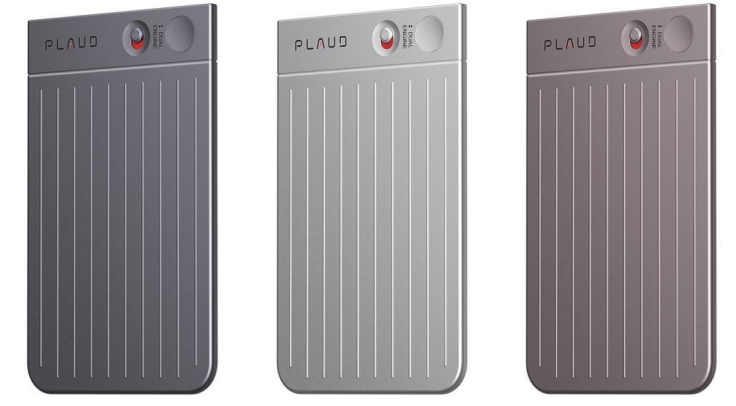
The Plaud AI voice recorder is a compact recording device that integrates artificial intelligence with high-quality audio capture. Unlike traditional recorders that simply store audio files, this smart device can process conversations and convert them into readable notes. By using an AI voice recorder for meetings, professionals can review discussions later without manually writing extensive notes.Another advantage of the device is its ability to organize information through a companion application. When recordings are uploaded to the system, the AI analyzes the conversation and produces transcripts, summaries, and structured insights. This functionality makes Plaud AI for meetings and notes an effective solution for professionals who need clear documentation of discussions, decisions, and action points.
Plaud Note Setup and Initial Configuration
- Charge the Device Before First Use
Begin by fully charging the Plaud Note AI voice recorder using the provided charging cable. A full charge ensures the device can record long meetings without interruptions.
- Install the Companion Mobile Application
Download the official app that connects with the recorder. This application processes recordings and enables AI transcription and note organization.
- Connect the Recorder to Your Smartphone
Pair the device with the mobile app using Bluetooth. This connection allows recordings to sync automatically for transcription and analysis.
- Create or Sign In to Your User Account
Setting up an account allows the system to store recordings securely. Your meeting notes and transcripts can then be accessed from multiple devices.
- Adjust Recording Preferences
Users can configure recording settings such as audio quality, language preferences, and transcription options depending on their meeting requirements.
- Test the Recorder Before Using It in Meetings
Conduct a short recording test to ensure the device captures clear sound and connects properly with the app.

Step-by-Step Guide to Recording Meetings
- Start the Recording Before the Meeting Begins
Activate the recorder before the discussion starts. This ensures the AI voice recorder for meetings captures the entire conversation from the beginning.
- Place the Recorder in a Central Position
Position the device on the table or near participants. Proper placement allows the recorder to capture voices clearly from different speakers.
- Allow the Recorder to Capture the Full Conversation
The device will continuously record audio during the meeting. Users can focus on discussions while the recorder collects all important information.
- Stop the Recording When the Meeting Ends
Once the conversation is complete, stop the recording and save the audio file. The recording will then be ready for AI processing.
- Upload the Recording to the App
The device transfers the recording to the mobile application, where artificial intelligence converts speech into text.
- Review the Generated Transcript and Summary
The AI processes the recording and produces a structured transcript with summarized meeting highlights.
How Plaud AI Organizes Meeting Notes
Once a recording is processed, the system transforms spoken conversations into organized documentation. The
AI voice recorder for meetings identifies important sections of the conversation and converts them into readable notes. This feature helps professionals quickly understand key decisions without listening to the entire recording.The application may also categorize information such as discussion topics, action points, and follow-up tasks. This structured organization makes Plaud AI for meetings and notes extremely helpful for project managers, executives, and team leaders who need to keep track of multiple conversations and decisions.
Best Practices for Using Plaud AI Voice Recorder
- Ensure Clear Audio Capture
Place the recorder where voices are easily heard. Avoid covering the microphone to maintain accurate recording quality.
- Record in a Quiet Environment When Possible
While the device handles background noise well, clearer environments improve transcription accuracy.
- Use the App to Review Transcripts Promptly
Reviewing transcripts soon after the meeting helps users verify details and highlight key insights.
- Organize Recordings by Meeting or Project
Properly labeling recordings in the app helps users quickly locate discussions later.
- Use AI Summaries for Quick Reviews
The AI-generated summaries allow professionals to understand meeting outcomes without replaying long recordings.
- Store Important Notes Securely
Saving transcripts and summaries in cloud storage ensures important meeting records remain accessible and protected.
Why Choose Heaven Star
- Access to Advanced AI Productivity Tools
At Heaven Star, we provide innovative devices such as the Plaud Note AI voice recorder designed for modern workplaces.
- Authentic Technology Products
We ensure every AI voice recorder for meetings we supply is genuine and sourced from reliable manufacturers.
- Expert Product Knowledge
Our team provides guidance on Plaud Note AI how to use and helps customers understand the device’s features.
- Trusted Electronics Supplier
Many professionals rely on us when searching for productivity tools that simplify meeting documentation.
- Reliable Customer Support
We assist customers with Plaud Note setup and usage, ensuring they can use the device efficiently.
- Competitive Pricing and Availability
Our goal is to make innovative devices like the Plaud AI voice recorder accessible to professionals and organizations.
Conclusion
Managing meetings effectively requires accurate documentation of discussions, decisions, and action items. The Plaud Note AI voice recorder provides a powerful solution by capturing conversations and transforming them into organized notes through artificial intelligence. By learning how to use Plaud AI voice recorder, professionals can simplify meeting documentation and focus more on meaningful participation.At
Heaven Star, we believe smart productivity tools like the AI voice recorder for meetings are becoming essential in modern workplaces. With proper Plaud Note setup and usage, professionals can streamline information management, improve collaboration, and maintain clear records of important discussions.
FAQs
- What is Plaud AI voice recorder used for?
The Plaud AI voice recorder is used to record conversations and convert them into structured notes using artificial intelligence.
- How do I start recording with Plaud Note AI?
Simply press the record button on the device before the meeting begins to capture the entire conversation.
- Does Plaud AI automatically create notes from recordings?
Yes, the system processes recordings and generates transcripts and summaries through the companion application.
- Can Plaud AI be used in business meetings?
Yes, it works effectively as an AI voice recorder for meetings, helping professionals document discussions accurately.
- Is the Plaud AI recorder difficult to set up?
No, the Plaud Note setup and usage process is simple and involves connecting the device to the companion app.
- Can I access recordings later?
Yes, recordings are stored in the app where users can review transcripts and summaries anytime.
- Does Plaud AI support multiple languages?
Many AI transcription systems support multiple languages for meeting documentation.
- Where can I buy the Plaud AI voice recorder?
You can purchase the Plaud Note AI voice recorder from trusted electronics suppliers like Heaven Star.


 Login/RegisterAccounts
 0
0






 SEO Team


